

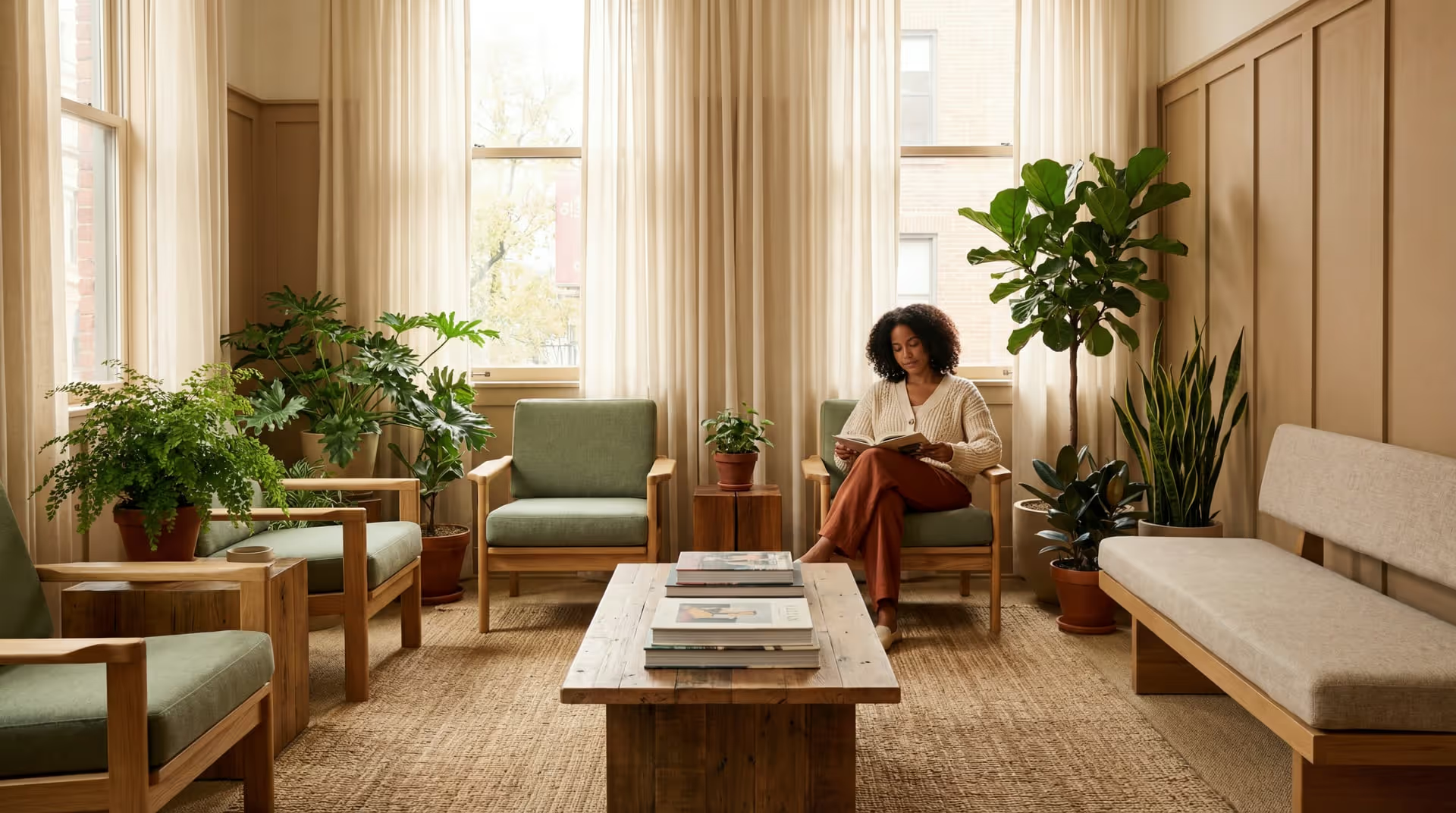

Design physical and virtual therapy spaces that put clients at ease. Covers office design, accessibility, telehealth backgrounds, and creating positive.
Overview
Creating a Welcoming Therapy Environment, Online and Off
The environment where therapy happens matters more than most clinicians realize. Before clients process a single word you say, they've already formed impressions based on your space—physical or virtual—that influence their comfort, openness, and trust.
Key takeaways
- Creating a Welcoming Therapy Environment, Online and Off The environment where therapy happens matters more than most clinicians realize.
- Before clients process a single word you say, they've already formed impressions based on your space—physical or virtual—that influence their comfort, openness, and trust.
- It tells clients "you belong here" and "your comfort matters." Conversely, a clinical, cold, or chaotic environment can trigger defenses, increase anxiety, and create barriers to the therapeutic work.
- This guide covers evidence-informed principles and practical strategies for creating spaces—both in-person and virtual—that support healing.
Details
A welcoming environment signals safety. It tells clients "you belong here" and "your comfort matters." Conversely, a clinical, cold, or chaotic environment can trigger defenses, increase anxiety, and create barriers to the therapeutic work.
This guide covers evidence-informed principles and practical strategies for creating spaces—both in-person and virtual—that support healing.
The Psychology of Therapeutic Space
Why Environment Matters
First impressions are powerful.
Research in environmental psychology shows that people form judgments about spaces within seconds—and these judgments influence:
- Perceived competence of the provider
- Sense of safety and comfort
- Willingness to self-disclose
- Expectations about treatment
- Overall satisfaction with care
Environment affects emotional state.
Spaces influence mood, arousal, and cognitive function:
- Clutter increases cortisol and anxiety
- Natural elements reduce stress
- Lighting affects mood and energy
- Temperature impacts comfort and irritability
- Noise levels affect concentration and safety perception
Environment communicates values.
Your space tells clients what you prioritize:
- A warm, thoughtful space: "Your comfort matters to me"
- A cold, clinical space: "This is just a medical transaction"
- A cluttered, chaotic space: "I'm overwhelmed too"
- An inaccessible space: "I didn't think about people like you"
The Therapeutic Frame
In psychodynamic terms, the "frame" includes all the consistent elements that structure therapy—time, place, fee, and physical space. A well-designed environment:
- Provides containment and safety
- Reduces external distractions
- Supports focus on internal experience
- Creates appropriate professional boundaries
- Remains consistent across sessions
Designing Physical Office Space
The Waiting Area
The waiting room is your client's first impression of your practice.
Essential elements:
Seating: Comfortable chairs with options (different heights, armrests, firmness). Avoid facing clients directly at each other—angle seating. Ensure adequate personal space.
Lighting: Warm, adjustable lighting. Avoid harsh fluorescents. Natural light is ideal if privacy permits.
Sound: Soundproofing or white noise to prevent overhearing. Music (optional) should be calm and inoffensive.
Reading material: Current, neutral magazines. Psychoeducational materials. Avoid controversial topics.
Amenities: Tissues, water, coat hooks, a clock. Phone charging available. Clean restroom access.
Signage: Clear wayfinding. Office policies posted. Therapist names (if comfortable for clients).
Common mistakes to avoid:
- Playing news channels (triggering)
- Exposing client identities to each other
- Uncomfortably close seating
- Outdated or depressing decor
- No soundproofing (hearing sessions)
The Therapy Room
This is where the work happens. Design for safety, comfort, and therapeutic function.
Seating arrangement:
Positioning: Chairs at angles (not directly facing) feels less confrontational. Client should not feel trapped—ensure easy exit path.
Chair selection: Offer choice when possible (some prefer firmer, some softer). Ensure different body sizes accommodated. Consider mobility limitations (chair height, armrests).
Distance: Typically 4-6 feet apart. Too close feels invasive; too far feels disconnected. Should feel intimate but not intrusive.
Therapist positioning: Be mindful of power dynamics. Avoid positioning yourself higher than clients. Don't sit behind a desk for therapy sessions.
Lighting:
- Natural light is best (with privacy solutions)
- Layered lighting options (overhead, lamps)
- Dimmable for different needs/times
- Avoid harsh shadows on faces
- Consider how lighting affects video calls for hybrid use
Color psychology:
| Color | Effect | Best Use |
|---|---|---|
| Blue | Calming, trustworthy | Main walls, accents |
| Green | Restful, natural | Accents, plants |
| Warm neutrals | Welcoming, grounding | Base colors |
| Earth tones | Stable, natural | Furniture, floors |
| Bright colors | Energizing (can be overstimulating) | Small accents only |
Avoid: Stark white (clinical), bright red (activating), dark colors that absorb light.
Decor and objects:
Art: Calming, non-controversial images. Nature scenes, abstract art. Avoid anything potentially triggering (even seemingly benign images can affect trauma survivors).
Plants: Live plants improve air quality and mood. If maintenance is challenging, quality artificial plants work. Avoid plants toxic to those who might touch them.
Personal items: Some personalization builds connection, but be thoughtful about what you share. Photos and objects invite questions—be prepared.
Therapy tools: Have fidgets, stress balls, drawing supplies accessible. Tissues prominently available. Blankets for comfort.
Bookshelf: Can display credentials and signal expertise. Be mindful of what titles reveal about your approach.
Sensory considerations:
Sound: Soundproofing is essential for confidentiality and client comfort. White noise machines outside doors. Consider sound dampening within room.
Smell: Neutral is best. Avoid strong air fresheners. Clean regularly. If using essential oils, ask about sensitivities.
Temperature: Maintain comfortable temperature (68-72F typical). Have blankets available. Ensure client can adjust if possible.
Texture: Consider tactile experience of furniture, blankets, fidgets. Varied textures can be grounding.
Accessibility Considerations
An accessible space isn't just legally required—it signals that all clients are welcome.
Physical accessibility:
- Ground floor or elevator access
- Wide doorways (32" minimum)
- Accessible parking near entrance
- Clear paths without obstacles
- Accessible restroom
- Seating for various mobility needs
- Adjustable lighting for visual needs
Sensory accessibility:
- Low-stimulation option for sensory sensitivities
- Quiet waiting area option
- Dim lighting option
- Minimal fragrance
- Clear signage (large text, high contrast)
Neurodiversity considerations:
- Fidgets and sensory tools available
- Predictable, consistent environment
- Option to reduce visual clutter
- Noise-canceling headphones available
- Clear expectations about space
Questions to ask yourself:
- Can someone using a wheelchair navigate my entire space?
- Can someone with low vision find my office?
- Can someone with auditory sensitivities feel comfortable here?
- Can someone with fragrance sensitivity be here safely?
- Have I considered needs I don't personally have?
For comprehensive accessibility guidance, consult the ADA National Network.
Creating Distinct Zones
If space allows, create zones for different functions:
Reception/waiting: Where clients wait and check in Transition space: Hallway or buffer between waiting and therapy Therapy room(s): Where sessions happen Private space: For clinician between sessions Administrative space: For staff functions
Purpose of zones:
- Clear transitions between spaces
- Privacy protection
- Professional boundaries
- Different environmental needs
Designing Virtual Therapy Spaces
The Telehealth Background
Your video background is your virtual office. It shapes client perception just as physical space does.
What your background communicates:
| Background Type | Message Conveyed |
|---|---|
| Professional home office | Competent, established, warm |
| Bookshelf with credentials | Knowledgeable, traditional |
| Plain wall with art | Clean, uncluttered, intentional |
| Virtual background | Something to hide? (Sometimes necessary) |
| Visible bedroom/messy space | Unprofessional, boundaries unclear |
| Overly clinical | Cold, transactional |
Best practices for backgrounds:
Physical background (recommended):
- Neutral, uncluttered wall or bookshelf
- Good depth (don't sit against wall)
- Thoughtful decor (plants, calm art, books)
- Nothing distracting or controversial
- Consistent session to session
If using virtual backgrounds:
- Choose professional, static images
- Ensure it works well with your camera
- Test for glitches before sessions
- Have backup physical space ready
- Consider: what is this hiding?
Lighting for Video
Lighting dramatically affects how clients perceive you on camera.
Key principles:
Front lighting: Light source should face you, not behind you. Backlight (windows behind you) creates silhouettes.
Soft, diffuse light: Harsh direct light creates shadows. Use diffusers or bounce light off walls.
Eye level or slightly above: Light from below creates unflattering shadows. Ring lights or desk lamps at eye level work well.
Consistent: Keep lighting similar session to session. Avoid changing natural light during sessions.
Equipment options:
- Ring light (good diffuse light)
- Desk lamp with diffuser
- Window light (in front of you)
- Professional video lighting
Common mistakes:
- Sitting with window behind you (backlit)
- Overhead-only lighting (shadows under eyes)
- Harsh direct light (unflattering)
- Variable lighting (distracting)
Audio Quality
Poor audio actively interferes with the therapeutic relationship—clients struggle to hear you, feel disconnected, and may miss important content.
Audio essentials:
Quiet space: Minimize background noise. Use a room away from traffic, HVAC, and household noise.
Quality microphone: Built-in laptop mics are inadequate. Use:
- USB microphone (Blue Yeti, etc.)
- Headset with microphone
- Airpods/quality earbuds
Acoustic treatment: Reduce echo with rugs, curtains, soft furnishings. Small rooms echo less.
Test regularly: Check audio quality with colleagues. Ask clients about their experience.
Camera and Framing
Camera position:
- Eye level (not looking up your nose or down at you)
- Centered in frame
- Appropriate distance (head and shoulders visible)
- Stable (no shaky laptop placement)
Eye contact:
- Look at camera when speaking (not at screen)
- Position video window near camera
- Practice until natural
Equipment:
- External webcam often superior to built-in
- Stable mounting (tripod or monitor mount)
- 1080p resolution minimum
The Client's Environment
Your environment is only half the equation. Help clients optimize their space:
Client guidance to provide:
- Private, quiet space where they won't be overheard
- Stable internet connection (wired if possible)
- Charged device or plugged in
- Headphones for privacy
- Water and tissues nearby
- Plan for interruptions (lock door, silence phone)
What to do when client environment is compromised:
- Check in about privacy before sensitive discussions
- Offer to reschedule if environment is unsuitable
- Problem-solve barriers collaboratively
- Document limitations in notes
For more on telehealth best practices, see our telehealth guide.
First Impressions: The New Client Experience
Before They Arrive
First impressions start before the client enters your space.
Website and online presence:
- Professional photos of your space
- Clear directions and parking information
- What to expect on first visit
- Answers to common questions
Pre-appointment communication:
- Confirmation with clear details
- Instructions for finding you
- Intake paperwork sent in advance
- Personal touch (not just automated)
Intake paperwork:
- Clear, professional forms
- Explain purpose of each form
- Accessible formats (large print, electronic options)
- Not overwhelming in volume
The First Moments
Arrival experience:
- Easy to find and enter
- Welcoming waiting area
- Clear check-in process
- Minimal wait time
- Warm greeting from staff or clinician
Greeting the client:
- Timely (don't leave them waiting)
- Warm but professional
- Use their preferred name
- Offer orientation to space
- Make them comfortable before diving in
First session environment:
- Temperature comfortable
- Tissues, water visible
- Seating choice offered
- Clock visible (reduces anxiety about time)
- Feel of safety and containment
Common First-Visit Anxieties
New clients often worry about:
- "Will I be judged?"
- "What do I do when I get there?"
- "Will anyone see me?"
- "What will we talk about?"
- "What if I cry?"
Your environment can address these:
- Private, discrete entrance/waiting
- Clear signage and expectations
- Tissues prominently available
- Warm, non-clinical atmosphere
- Visible evidence of professionalism
For strategies on converting first visits into ongoing treatment, see our client retention guide.
Special Considerations
Child and Adolescent Spaces
For children:
- Age-appropriate seating (bean bags, floor cushions)
- Play therapy materials accessible
- Art supplies, toys, games
- Safe, childproofed space
- Separate waiting from adult clients if possible
- Visual supports for expectations
For adolescents:
- Not too childish, not too adult
- Comfortable seating options (couch, bean bag)
- Some technology integration
- Private space from parents
- Relevant decor (but not trying too hard)
Group Therapy Spaces
Unique needs:
- Adequate seating for group size
- Circle or semi-circle arrangement
- Equal sight lines for all
- Good acoustics for group discussion
- Privacy from outside
- Clear start/end to sessions
Couples and Family Therapy
Consider:
- Larger room with multiple seating areas
- Ability to separate individuals briefly
- Equal positioning for partners/family members
- Neutral decor (no family photos that might trigger)
- Whiteboard or flip chart for exercises
Trauma-Informed Space Design
For practices serving trauma survivors, environmental considerations are heightened:
Safety signals:
- Clear exit paths
- No trapped feelings
- Predictable environment
- Low startle potential (no sudden sounds, movements)
Regulation supports:
- Grounding objects (weighted blanket, texture items)
- Calm colors and decor
- Natural elements
- Adjustable sensory input
Choice and control:
- Seating options
- Lighting control if possible
- Temperature adjustment
- Ability to see the door
Maintaining Your Space
Daily Maintenance
- Tidy between clients
- Fresh tissues available
- Remove any previous client items
- Quick visual check of space
- Test technology (telehealth)
Regular Maintenance
- Deep cleaning weekly
- Decor refresh seasonally
- Equipment checks monthly
- Professional cleaning as needed
- Plant care (if applicable)
Periodic Assessment
Questions to review quarterly:
- Is the space still meeting client needs?
- What feedback have we received about environment?
- Are there accessibility improvements needed?
- Is equipment functioning well?
- Does the space reflect our current practice?
For gathering systematic feedback on your space, see our client feedback guide.
Frequently Asked Questions
How much should I spend on office design?
Invest proportionally to your revenue and client expectations. You don't need expensive furniture, but quality matters. Prioritize: good seating, soundproofing, appropriate lighting, cleanliness. A thoughtfully designed modest space beats an expensive but poorly planned one.
Can I do therapy in my home?
Yes, with careful attention to boundaries, confidentiality, and professionalism. Ensure complete separation from personal living space, professional-grade soundproofing, dedicated entrance if possible, and consistent therapeutic frame.
What about using a coworking space or shared office?
Shared spaces can work with attention to: soundproofing, consistent availability, professional common areas, HIPAA compliance of any shared services, and your control over the therapy room environment.
How do I handle a client who complains about my space?
Take feedback seriously. Ask what specifically is uncomfortable. Make adjustments where possible. If preferences can't be accommodated, discuss honestly. Use feedback to improve. See our client feedback guide for more.
What's the minimum viable telehealth setup?
Essential: quiet private space, decent internet, external microphone or quality headset, camera at eye level, neutral non-distracting background, good front lighting. Nice to have: professional webcam, ring light, dedicated office space, acoustic treatment.
How do I balance professionalism with warmth?
Professionalism and warmth aren't opposites. A warm, welcoming space can still be professional. Avoid extremes: not so clinical it feels cold, not so casual it feels unprofessional. Think "comfortable professional" rather than choosing between the two.
What environmental accommodations am I legally required to provide?
The ADA requires reasonable accommodations for disabilities. This includes physical accessibility, but also sensory and cognitive accommodations. Consult the ADA National Network for specifics. Beyond legal requirements, accessibility is simply good practice.
Ready to enhance your practice environment? Ease Health's platform helps you deliver excellent client experiences from first contact through treatment, with tools for scheduling, client communication, and practice management. Schedule a demo to learn more.
Next steps
- Review the key takeaways and adapt them to your practice workflow.
- Use the details section as a checklist when you implement or troubleshoot.
- Share this with your billing or admin team to align on process and terminology.